Combine
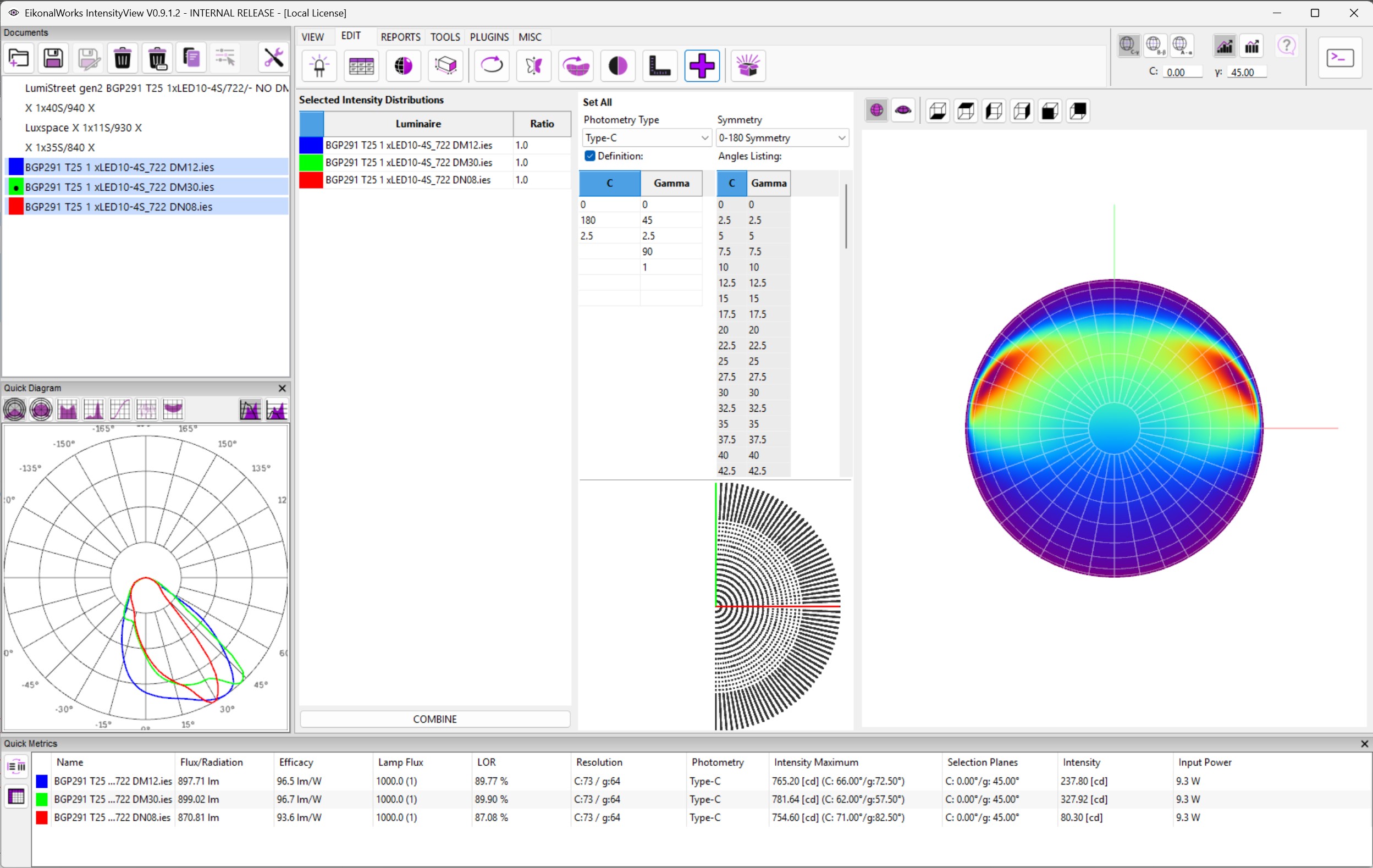
The Combine page creates a new combined photometry from selected intensity distributions. It is useful when different emitters or lens variants must be combined into one photometric result.
Selected Intensity Distributions
The left grid lists the selected photometries.
- The color column identifies each source by its display color.
- Luminaire shows the emitter or photometry name.
- Ratio is an editable multiplier for that source. Negative ratios are allowed, but the value must be numeric.
Changing a valid ratio refreshes the result preview.
Result Type And Resolution
The middle panel defines the photometry type, symmetry, and angular resolution of the combined result. It uses the same Definition and Angles Listing behavior as the Photometry Type And Resolution page.
Changing the result setup rebuilds the preview using the selected resolution before the meshes are combined.
Result Preview
The right panel previews the combined mesh. The view toggle switches between Sphere View and 3D View. The orientation controls rotate the preview camera. Clicking the preview updates the shared focus direction, like the normal 3D view pages.
Combine
COMBINE executes the combine action with the current source ratios and result resolution. The selected meshes are resampled to the requested setup and combined according to the ratios.