Rotation
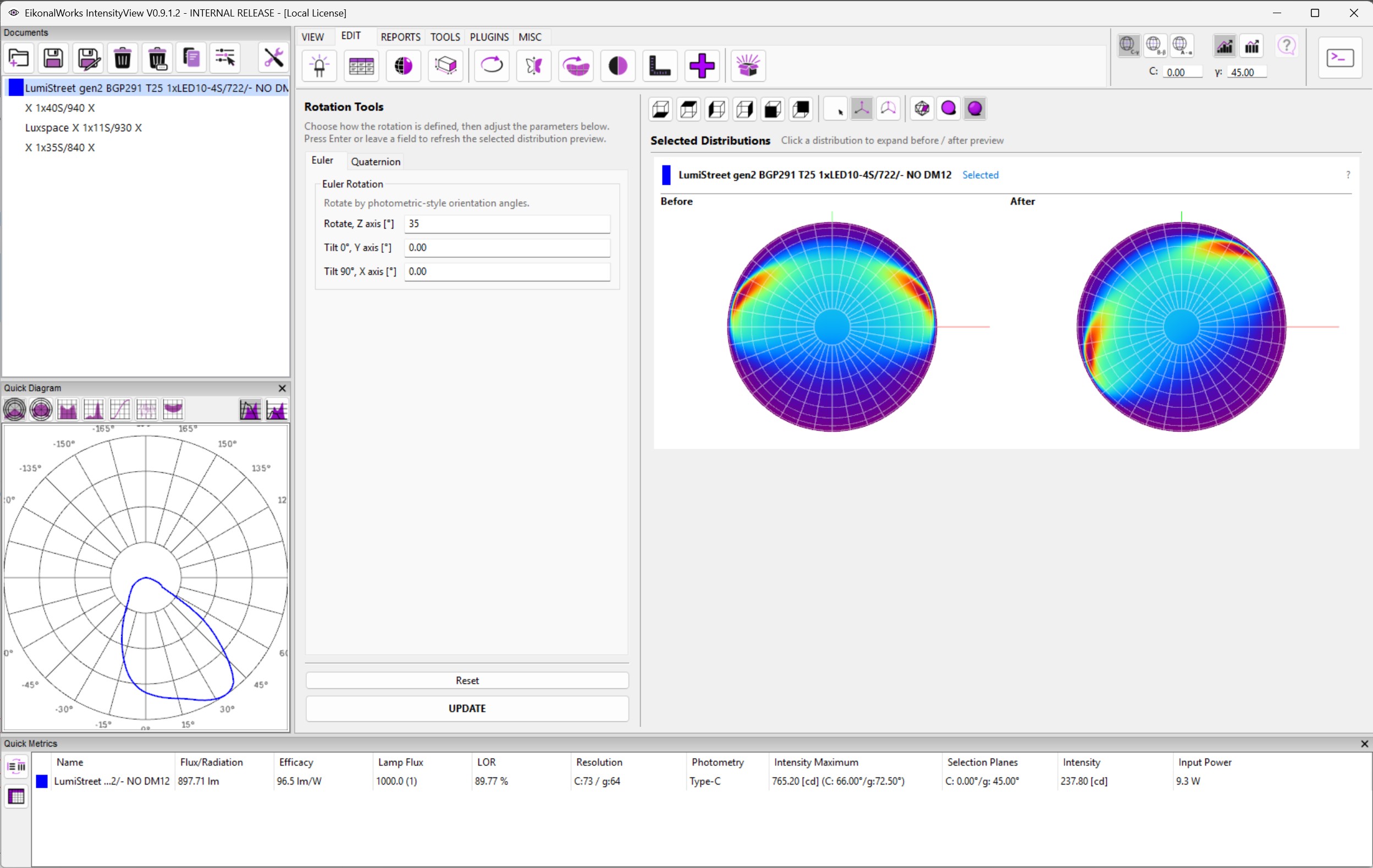
The Rotation page rotates selected intensity distributions. The right side shows a before/after preview; the original data is changed only when UPDATE is pressed.
Euler
The Euler tab applies three sequential rotation values:
- Rotate, Z axis [deg]
- Tilt 0 deg, Y axis [deg]
- Tilt 90 deg, X axis [deg]
This mode is convenient for simple photometric orientation corrections.
Quaternion
The Quaternion tab uses an axis-angle definition:
- Axis X, Axis Y, and Axis Z define the rotation axis.
- Angle [deg] defines the rotation around that axis.
A quaternion represents 3D orientation as a single mathematical rotation instead of a sequence of axis rotations. This makes the operation gimbal-lock free, because the rotation does not depend on intermediate Euler angle states where two rotation axes can align.
Validation And Actions
Changing a value and pressing Enter, or leaving the field, refreshes the preview. All values must be finite numbers. In Quaternion mode, the axis vector must not be near zero.
Reset returns Euler values to 0 and the Quaternion axis to (0, 0, 1) with angle 0. UPDATE applies the active tab's rotation to all selected non-result photometries.