Properties
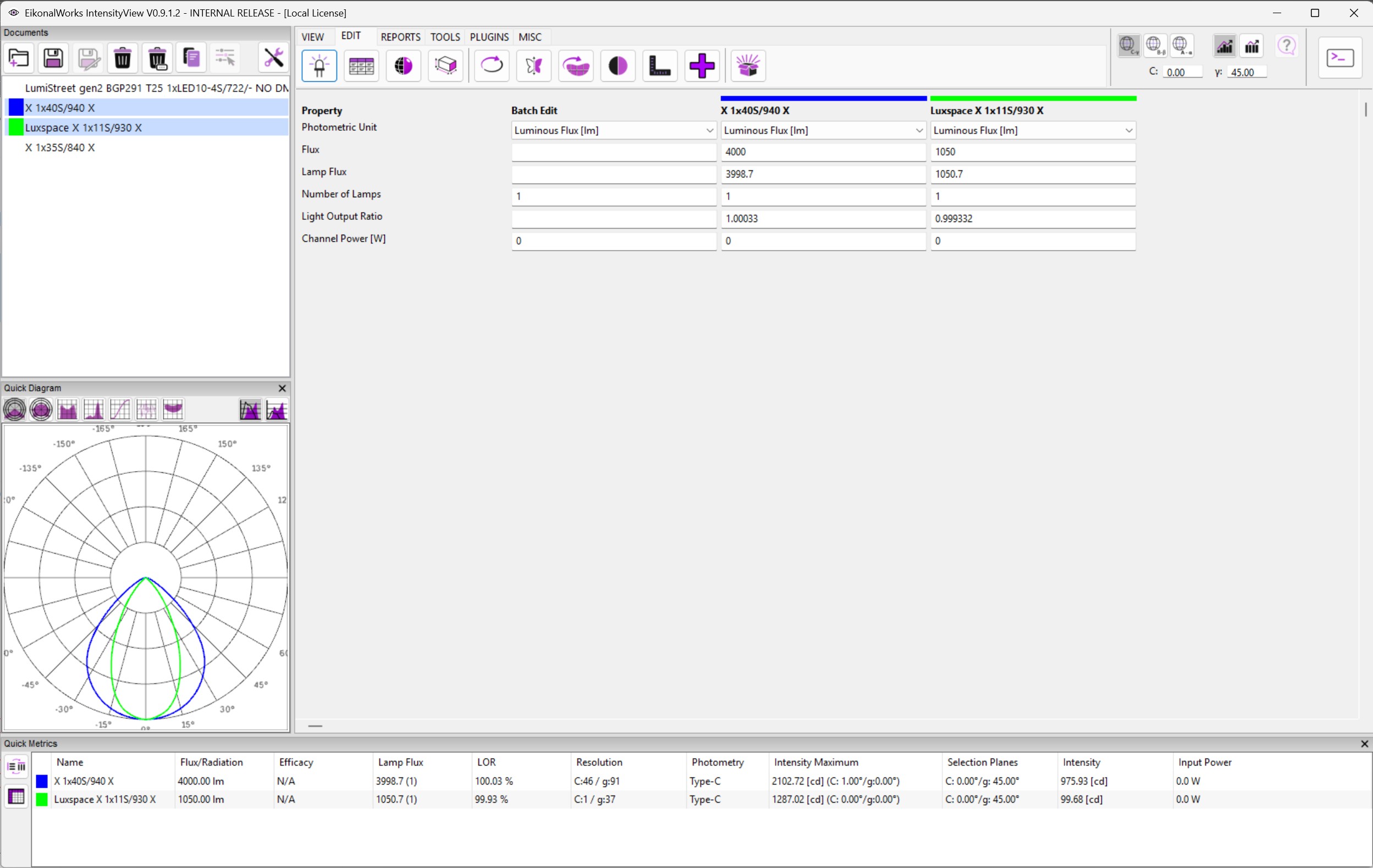
The Properties page edits the core photometric quantities of the selected intensity distributions. It displays one column for each selected photometry and, when more than one photometry is selected, an additional Batch Edit column.
Edited Values
- Photometric Unit selects the quantity represented by the photometry: Luminous Flux [lm], Radiant Power [mW], Radiant Power [W], or PAR [umol/s].
- Flux edits the total flux or power value in the active photometric unit.
- Lamp Flux edits the luminous flux assigned to one lamp.
- Number of Lamps edits the lamp count and must be a whole number.
- Light Output Ratio edits the emitter light output ratio.
- Channel Power [W] edits the electrical channel power.
Batch Edit
The Batch Edit column is visible only when multiple intensity distributions are selected. A value entered in this column is applied to every selected photometry. If the selected photometries do not currently share the same value, the batch field starts empty so that an accidental mixed-value overwrite is avoided.
Validation And Commit
Numeric values are committed when Enter is pressed in the edited field. Invalid values are highlighted with a red background and are not applied.
- Flux and Lamp Flux must be larger than zero.
- Number of Lamps must be an integer of at least 1.
- Light Output Ratio must be larger than zero and no larger than 1.
- Channel Power must be zero or larger.