Property Fields
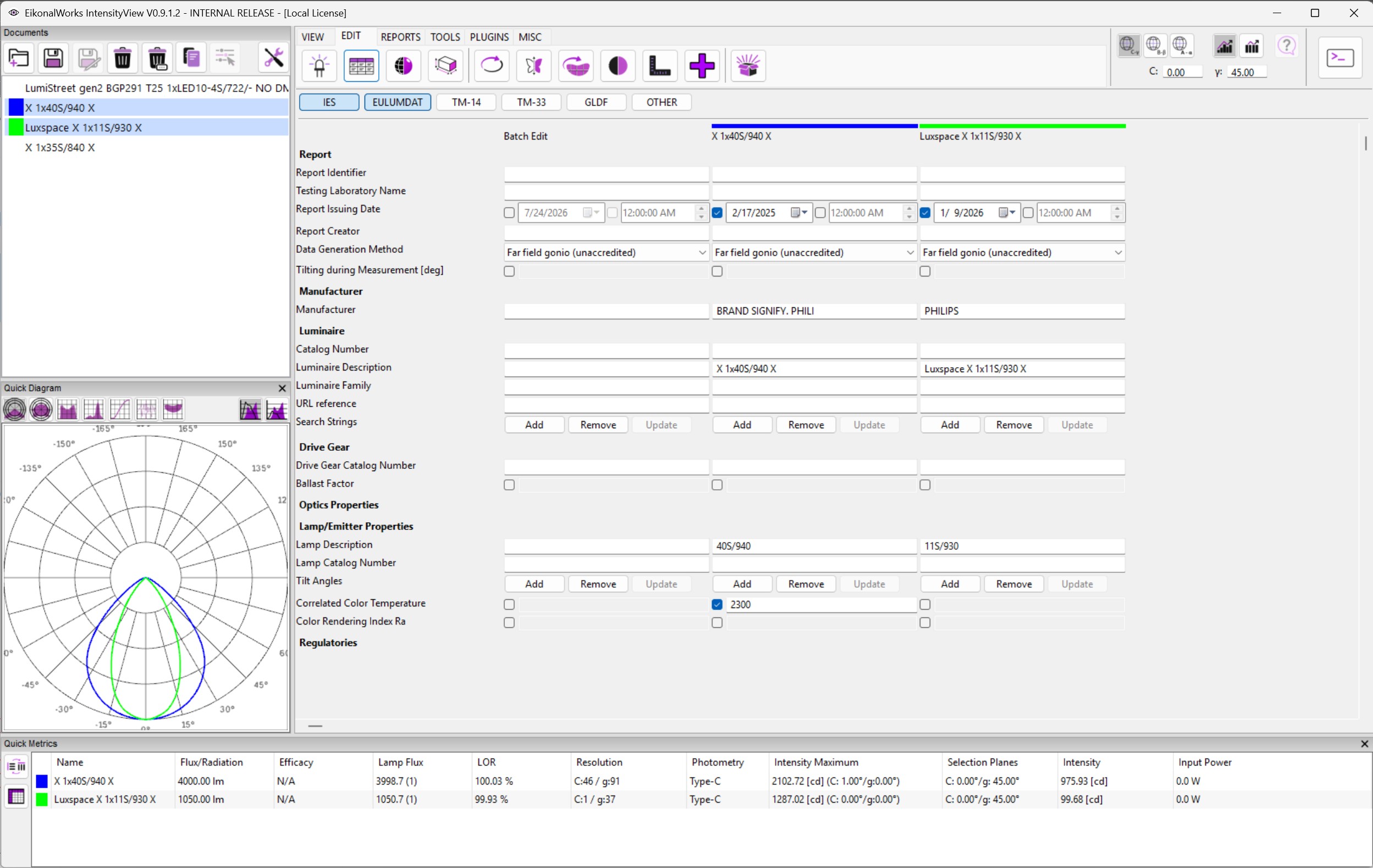
The Property Fields page edits structured metadata stored in the luminaire document and in the selected intensity mesh. It is intended for file-format information, report information, manufacturer data, lamp data, optical data, and regulatory fields.
Filter Bar
The toggle buttons at the top choose which file-format fields are shown.
- IES and EULUMDAT are enabled by default.
- TM-14, TM-33, GLDF, and OTHER can be enabled when those fields are relevant.
- Fields tagged for at least one active format are shown. Fields without a file-format tag are shown when OTHER is enabled.
Sections
The page groups fields by data ownership and purpose.
- Report, Manufacturer, Luminaire, Drive Gear, and Regulatories edit document-level metadata.
- Optics Properties and Lamp/Emitter Properties edit metadata attached to the selected intensity mesh.
- Result meshes do not expose mesh-level batch editing for Optics Properties or Lamp/Emitter Properties.
Batch Edit
When multiple photometries are selected, a Batch Edit column is shown. If every selected item has the same value for a field, the batch editor is prefilled with that value. If values differ or a field is missing, the batch editor starts from its template/default value. Applying the batch editor updates all affected selected intensity distributions.
Field Controls
- Text fields commit when Enter is pressed.
- Floating-point fields have an enable checkbox. When unchecked, the property is unspecified. When checked, the text field must contain a valid number.
- Integer fields have an enable checkbox, plus and minus buttons, and an editable number field.
- Boolean fields are simple checkboxes.
- Enum fields are drop-down choices.
- Image fields provide Select Image and Remove Image buttons and show a thumbnail preview. Supported image files include PNG, JPG, JPEG, BMP, GIF, and WEBP.
- Key/value list fields provide Add, Remove, and Update buttons. Add appends a blank pair, Remove deletes the last pair, and Update commits pending changes.
- String list fields provide Add, Remove, and Update buttons for line-style list values.
- Date fields use an enable checkbox, a date picker, a time checkbox, and a time picker. The first checkbox specifies whether the date exists. The time checkbox controls whether a timestamp is stored; when it is unchecked, only the date is specified.
Invalid property values show a warning and are not applied.