EikonalWorks User's Manual
  • Workbench
  • IntensityView
Search Results for

    Show / Hide Table of Contents
    • Introduction
    • Installation and License Activation
    • User Interface
      • Keyboard Shortcuts
    • Supported File Formats
      • IES LM-63 Files
      • EULUMDAT Files
      • PHILLUM Files
      • EikonalWorks Intensity Files
      • IES TM-14 Files
      • IES TM-33 JSON Files
      • IES TM-33 XML Files
      • GLDF Files
    • View Modes
      • Sphere View
      • 3D View
      • 2D Map View
      • Table View
      • Illuminance View
      • Isocandela View
      • Polar And Cartesian Diagram View
      • Rendered Illuminance View
    • Edit Tools
      • Properties
      • Property Fields
      • Photometry Type And Resolution
      • Geometry Editor
      • Rotation
      • Symmetrize
      • Automatic Alignment
      • Smoothing And Denoising
      • Scale
      • Combine
      • Photometry Packaging Builder
    • Reports
      • UGR Table
      • UGR Chart
      • Soellner Diagram
      • Luminance Table
      • Utilization Factor Table
      • Uniformity Table
      • Zonal Lumen Table
      • Beam Spread
      • Luminaire Classification System
      • IES Roadway Report
      • Roadway Applicability
      • Color Plot
    • Tools
      • Photometry Modification Tool
      • Roadway Editor
      • Roadway Calculator
      • Roadway Generator
      • Roadway Optimizer
    • Plugins
      • LightTools Link
    • Miscellaneous
      • License Management

    Beam Spread

    Beam Spread

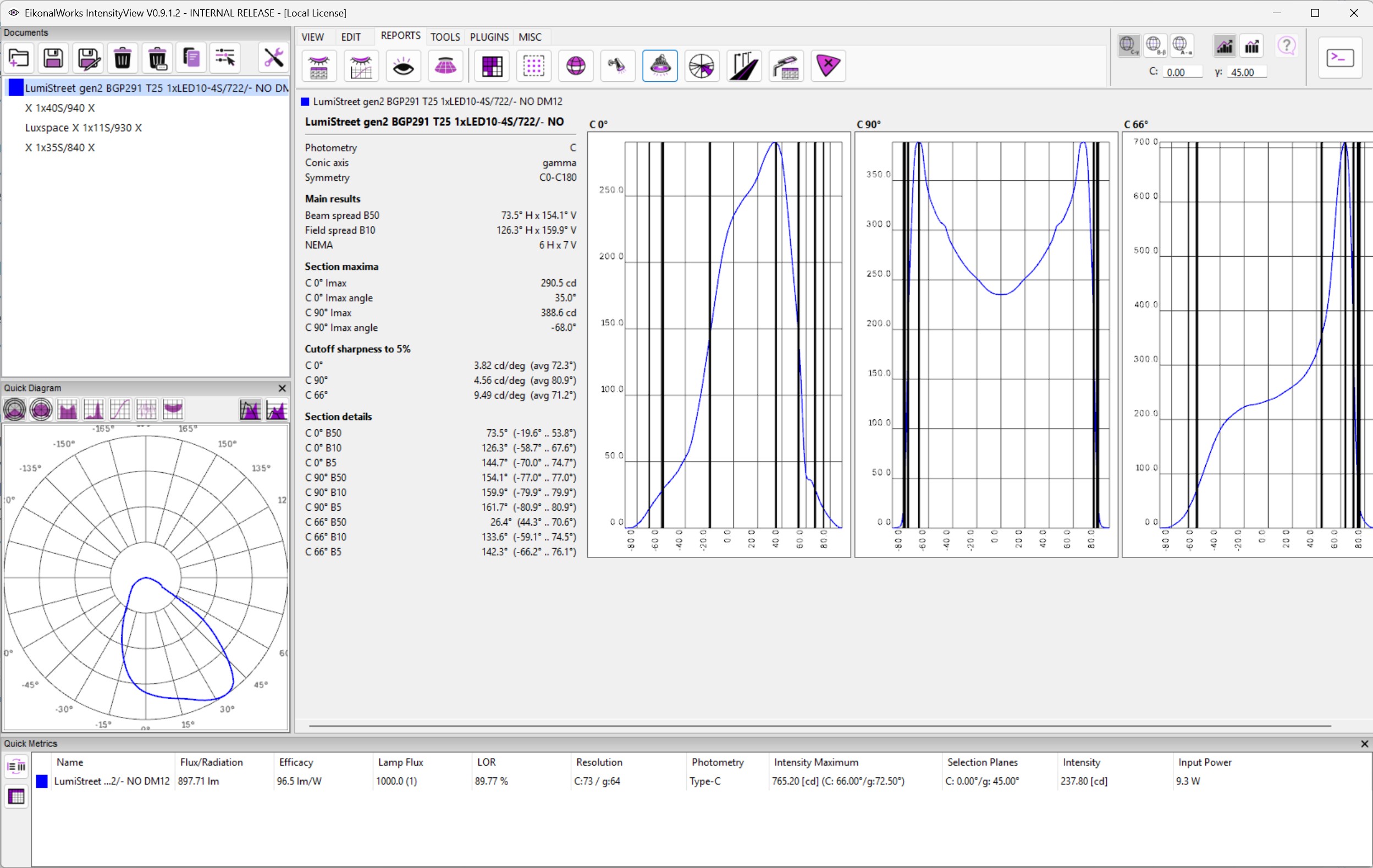
    The Beam Spread report calculates beam width values for the selected photometries. It is intended for luminaires where the useful light output can be described by one or more angular spread measurements.

    Report Values

    The report evaluates the angular width of the distribution at common relative intensity levels. Typical beam metrics include full width at half maximum and wider field-angle values. Narrow values indicate a concentrated beam; wide values indicate a broad distribution.

    Reading The Diagram

    Use the diagram to compare spread in the main photometric planes. If the distribution is asymmetric, the reported values can differ by plane. Review both the numeric values and the plotted shape before assigning a beam category.

    Practical Use

    Beam spread is useful for spot, flood, high-bay, and accent distributions. For general area or roadway luminaires, combine this report with zonal lumen, LCS, or roadway reports for a more complete assessment.

    In this article
    Back to top Generated by DocFX