Roadway Generator
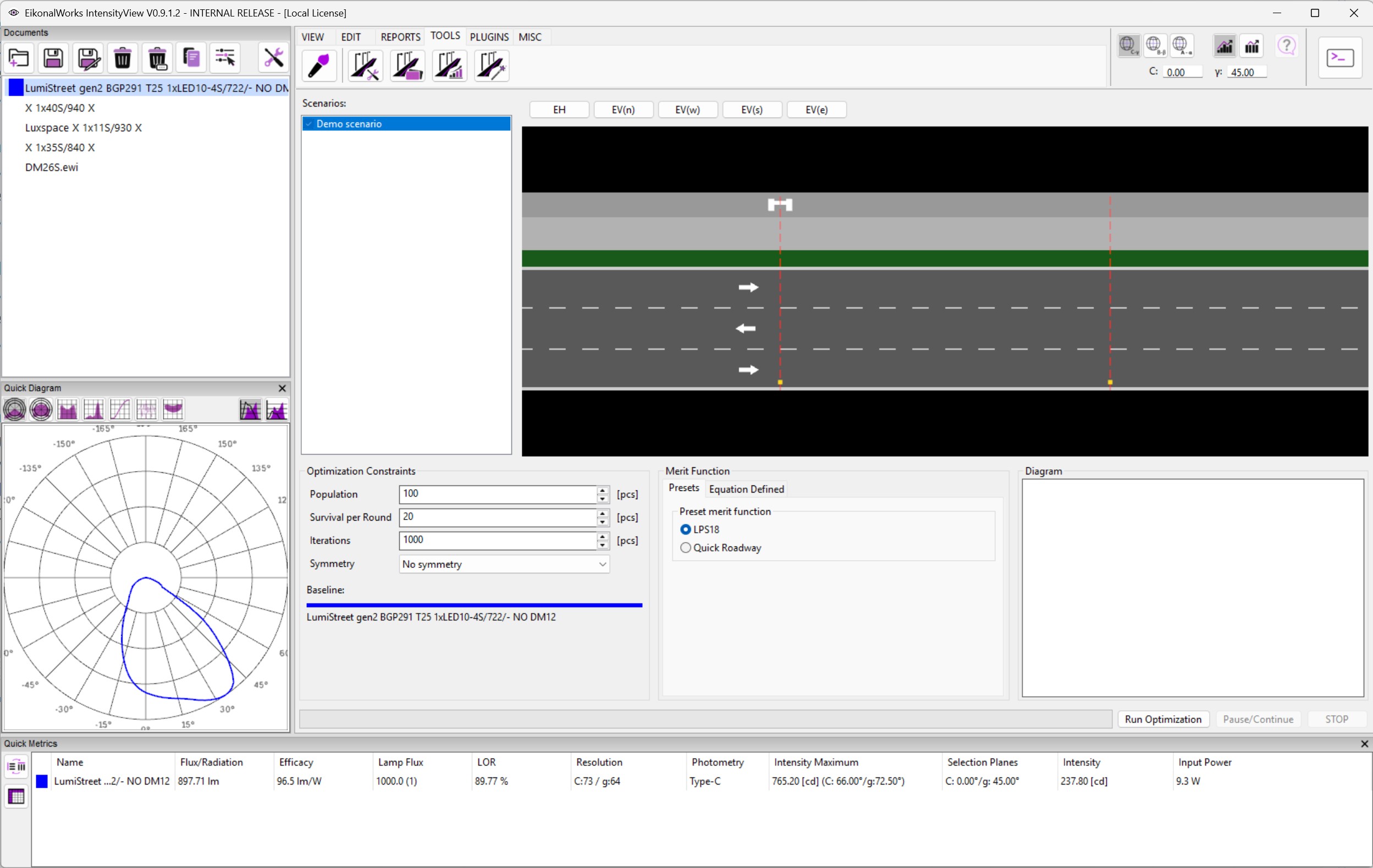
The Roadway Generator creates an idealized luminous intensity distribution for selected roadway scenarios. It uses a genetic algorithm to mutate candidate intensity meshes and keep candidates with the best merit score.
Scenario And Baseline
Select and check the roadway scenarios that should drive the generator. If an intensity distribution is selected, it is used as the baseline. If none is selected, the tool creates a Lambertian 1000 lm baseline.
Optimization Constraints
- Population: number of candidates in each generation.
- Survival per Round: number of best candidates kept for the next generation.
- Iterations: number of generations to run.
- Symmetry: constrains the generated distribution to no symmetry, bilateral symmetry, or quadrant symmetry.
Merit Function
The Presets tab provides built-in merit functions such as LPS18 and Quick Roadway. The Equation tab lists calculated terms as t1, t2, and so on, and lets an expression define the merit function.
The generator maximizes merit. Preset functions reward passing roadway requirements and lower required luminous flux.
Run Controls
Run starts optimization. Pause/Continue pauses the process and stores an interim result when available. Stop cancels a paused run. The chart plots the best merit over the optimization history.
Output
When optimization finishes, the generated intensity distribution is added to the open project as a new photometry.