EikonalWorks User's Manual
  • Workbench
  • IntensityView
Search Results for

    Show / Hide Table of Contents
    • Introduction
    • Installation and License Activation
    • User Interface
      • Keyboard Shortcuts
    • Supported File Formats
      • IES LM-63 Files
      • EULUMDAT Files
      • PHILLUM Files
      • EikonalWorks Intensity Files
      • IES TM-14 Files
      • IES TM-33 JSON Files
      • IES TM-33 XML Files
      • GLDF Files
    • View Modes
      • Sphere View
      • 3D View
      • 2D Map View
      • Table View
      • Illuminance View
      • Isocandela View
      • Polar And Cartesian Diagram View
      • Rendered Illuminance View
    • Edit Tools
      • Properties
      • Property Fields
      • Photometry Type And Resolution
      • Geometry Editor
      • Rotation
      • Symmetrize
      • Automatic Alignment
      • Smoothing And Denoising
      • Scale
      • Combine
      • Photometry Packaging Builder
    • Reports
      • UGR Table
      • UGR Chart
      • Soellner Diagram
      • Luminance Table
      • Utilization Factor Table
      • Uniformity Table
      • Zonal Lumen Table
      • Beam Spread
      • Luminaire Classification System
      • IES Roadway Report
      • Roadway Applicability
      • Color Plot
    • Tools
      • Photometry Modification Tool
      • Roadway Editor
      • Roadway Calculator
      • Roadway Generator
      • Roadway Optimizer
    • Plugins
      • LightTools Link
    • Miscellaneous
      • License Management

    Roadway Calculator

    Roadway Calculator

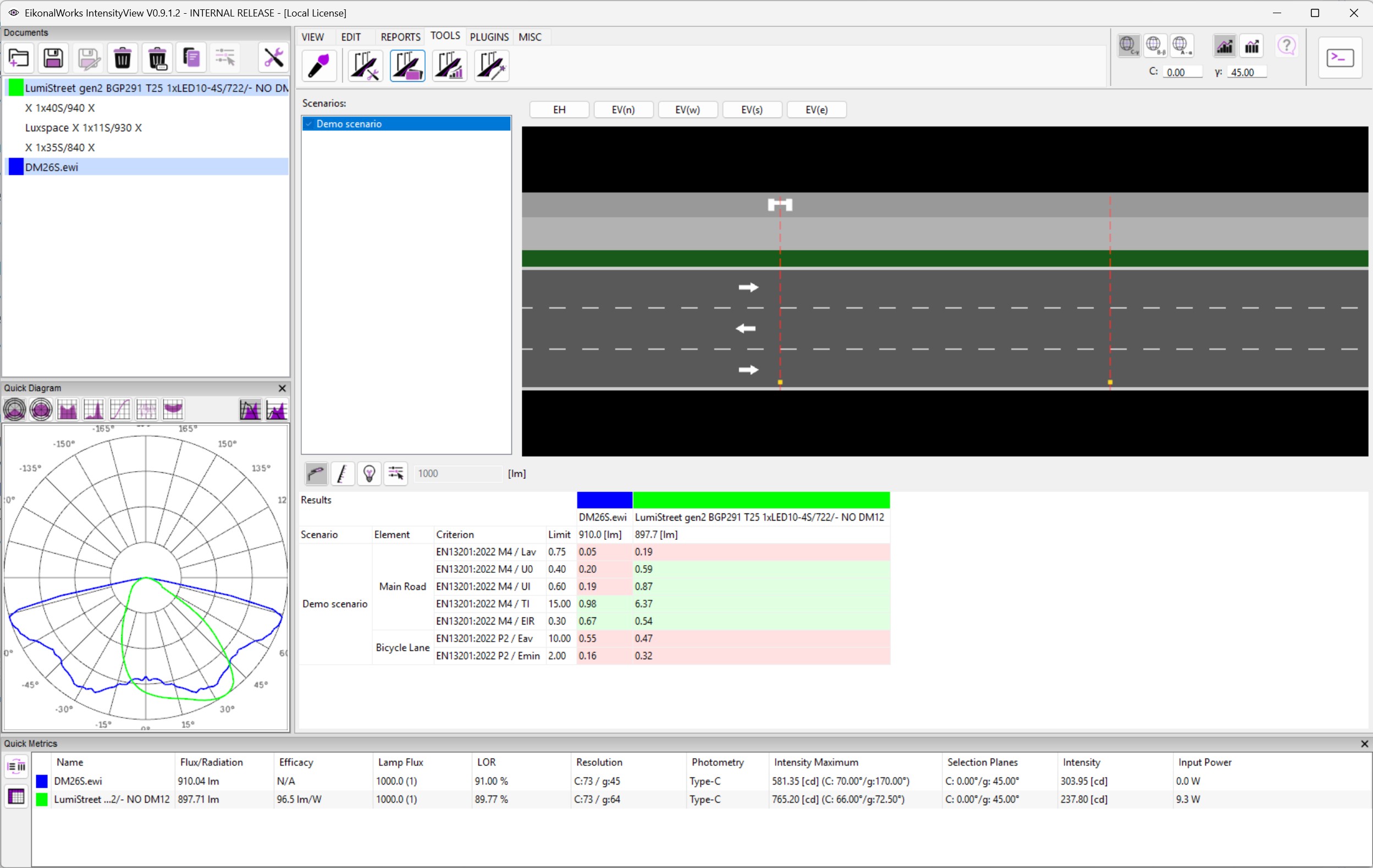
    The Roadway Calculator evaluates selected intensity distributions in selected roadway scenarios. It calculates roadway lighting criteria such as luminance, illuminance, uniformity, and glare-related values according to EN 13201-style valuation fields configured in the scenario.

    Scenario Selection

    Use the scenario list to select the preview scenario and check one or more scenarios for calculation. Checked scenarios are recalculated against the currently selected intensity distributions.

    Calculation Mode

    • Luminaire Flux Mode: calculates with each luminaire's current luminous flux.
    • Minimum Luminous Flux Mode: scales flux to the minimum value needed to meet average luminance or illuminance requirements, then reports whether all criteria pass.
    • Lamp Luminous Flux Mode: uses the entered lamp luminous flux and applies the luminaire light output ratio.
    • Set Luminous Flux Mode: directly sets the luminaire flux to the entered lumen value.

    The lumen input is enabled only for the two set-flux modes.

    Results

    The results table groups calculations by scenario and intensity distribution. Each criterion displays the required value, actual value, and pass/fail state. In minimum-flux mode, the table also shows the required luminous flux.

    In this article
    Back to top Generated by DocFX