EikonalWorks User's Manual
  • Workbench
  • IntensityView
Search Results for

    Show / Hide Table of Contents
    • Introduction
    • Installation and License Activation
    • User Interface
      • Keyboard Shortcuts
    • Supported File Formats
      • IES LM-63 Files
      • EULUMDAT Files
      • PHILLUM Files
      • EikonalWorks Intensity Files
      • IES TM-14 Files
      • IES TM-33 JSON Files
      • IES TM-33 XML Files
      • GLDF Files
    • View Modes
      • Sphere View
      • 3D View
      • 2D Map View
      • Table View
      • Illuminance View
      • Isocandela View
      • Polar And Cartesian Diagram View
      • Rendered Illuminance View
    • Edit Tools
      • Properties
      • Property Fields
      • Photometry Type And Resolution
      • Geometry Editor
      • Rotation
      • Symmetrize
      • Automatic Alignment
      • Smoothing And Denoising
      • Scale
      • Combine
      • Photometry Packaging Builder
    • Reports
      • UGR Table
      • UGR Chart
      • Soellner Diagram
      • Luminance Table
      • Utilization Factor Table
      • Uniformity Table
      • Zonal Lumen Table
      • Beam Spread
      • Luminaire Classification System
      • IES Roadway Report
      • Roadway Applicability
      • Color Plot
    • Tools
      • Photometry Modification Tool
      • Roadway Editor
      • Roadway Calculator
      • Roadway Generator
      • Roadway Optimizer
    • Plugins
      • LightTools Link
    • Miscellaneous
      • License Management

    Roadway Optimizer

    Roadway Optimizer

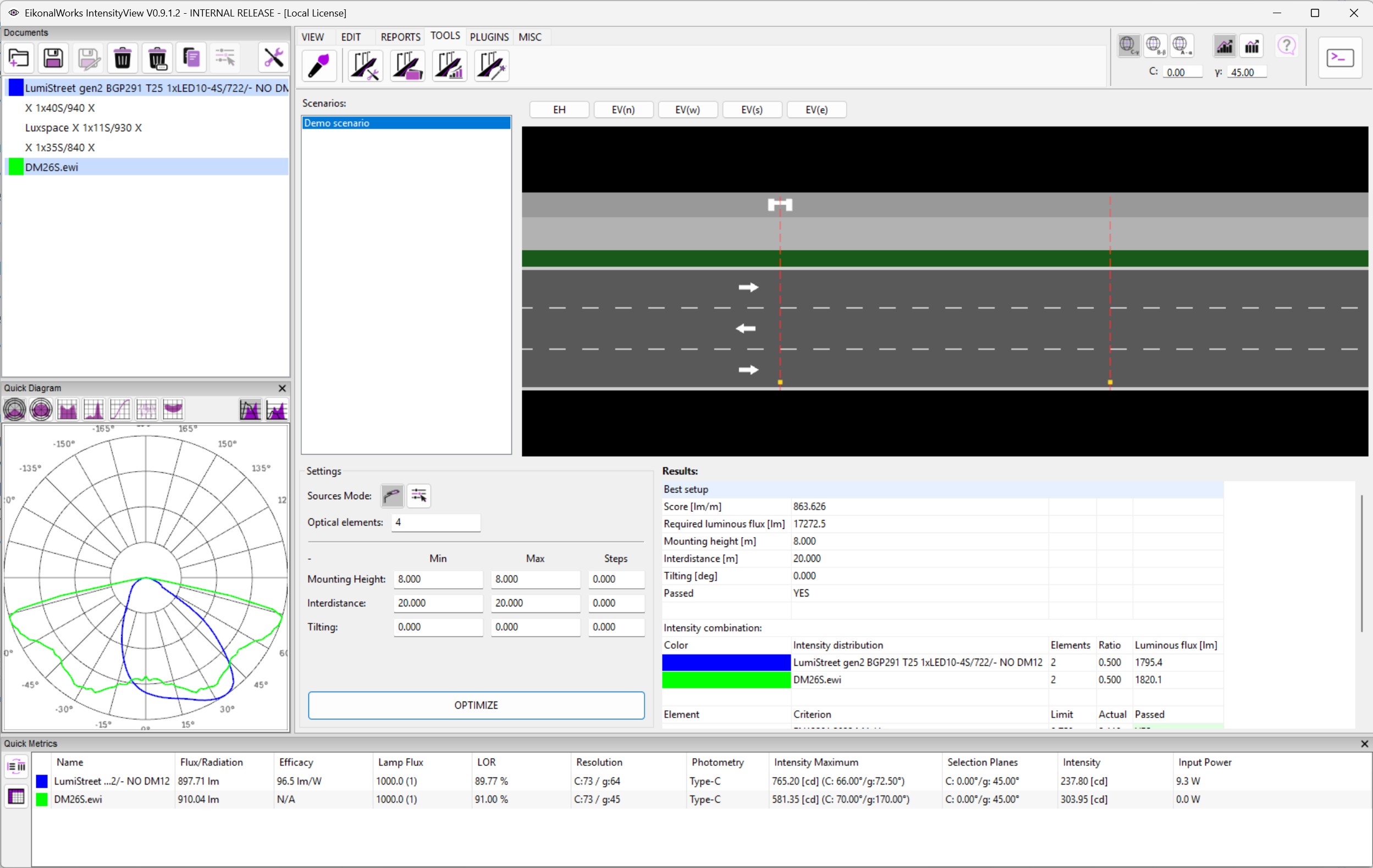
    The Roadway Optimizer searches combinations of existing intensity distributions and roadway arrangement parameters to find the best passing setup for a selected roadway scenario.

    Source Mode

    • Use selected intensity distributions: only the currently selected photometries are used as source optics.
    • Use all open intensity distributions: every open usable photometry is available to the optimizer.

    Settings

    • Optical elements: number of optical elements to combine. The optimizer searches integer mix counts across the available source distributions.
    • Mounting Height: minimum, maximum, and step for mounting height.
    • Interdistance: minimum, maximum, and step for pole distance.
    • Tilting: minimum, maximum, and step for tilt angle.

    When minimum and maximum are equal, a step of zero keeps the value fixed. When the range changes, the step must be positive. Invalid fields are highlighted before the optimizer runs.

    Optimize

    OPTIMIZE searches the parameter grid and source optic combinations. Candidates must pass all roadway criteria. The score is required luminous flux divided by interdistance, so lower scores are better.

    Results

    The best result table shows required flux, mounting height, interdistance, tilt, pass state, the source intensity mix, and the detailed valuation criteria.

    In this article
    Back to top Generated by DocFX